
Summary: Color calibrated Contex scanners will have an ICC (.ICM) file. There are 2 ways to check and confirm if a Contex scanner has been color calibrated.
GVD Software
-
Log in to GVD
-
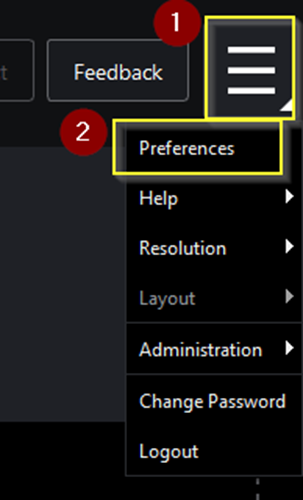
Select Menu and then Preferences
-
Scroll down to the Color Profiles section
-
Take a screenshot of the NextImage field which contains the path for the color profile (.ICM)
.png?cb=5b7efbec1d9d253cf31c91c4f474d1e6)
NextImage Software
-
Launch NextImage
-
Select Color Inspection
-
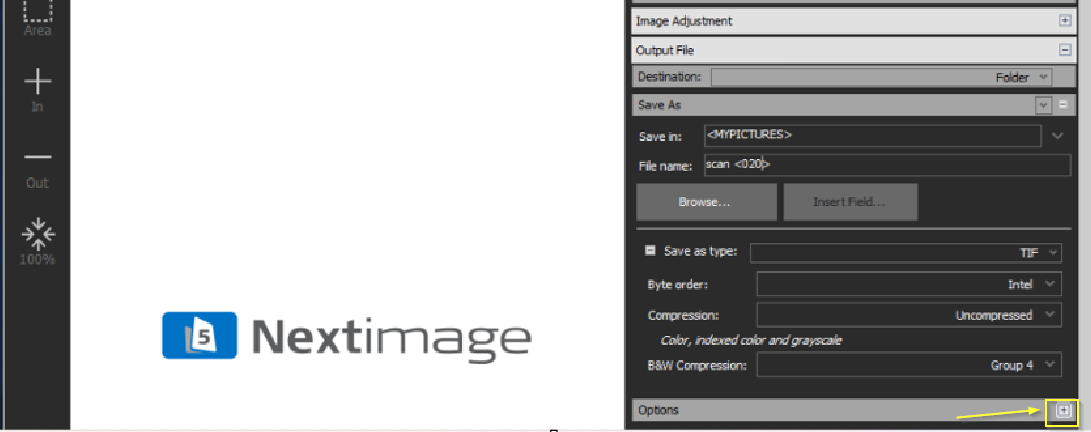
Scroll down to the Options section and expand it by pressing the plus (+) on the far right
-
Take a screenshot of the ICC profile field which contains color profile (.ICM)
.png?cb=bdd63a5fda8798712007b6539fc03fbd)
For color calibrated Epson scanner, please see How to check if your Epson Scanner is color calibrated