
|
Article Title |
Temporary Directory- Manually Redirect Cache Path |
|---|---|
|
Type |
Procedural |
|
Software |
GVD |
|
Software version |
5.4.0 |
For GVD users who use the software heavily, a lot of data may accumulate in the form of temporary files often stored in C:\Users\XXXX\AppData\Local\Temp.
Note that when scans are loaded in GV, large BMP files (0.1-0.2 GB) are stored in the temp folder:
Resolutions
-
The user can clear the files stored in this folder if they so wish. It will not affect the functionality of the software.
-
The user can also free up diskspace by redirecting the cache path within the GVD using these steps:
-
Access the preferences menu:
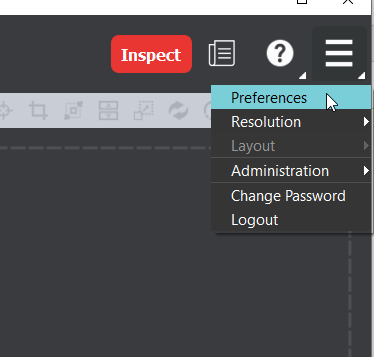
-
Navigate to System Paths → Cache Path:

-
Chose “Select” and designate a new path for the cache folder
-
Close and reopen GVD