
|
Article Title |
Cannot see any shadows on the embossed dots |
|
Type (Procedural / Informational /Troubleshooting) |
Troubleshooting |
|
Software |
Epson |
|
Software version |
v600 |
Problem:
The user was able to read the embossed braille from the rear side using Epson v500. Now with this v600, they can't see any shadows on the embossed dots and Globalvision is unable to read any braille.
Solution:
-
Advised the user to update the Epson driver to version: 3.9.3.0 US. The driver is found on the internet.
-
Once the driver is updated they need to open Epson Scan.
-
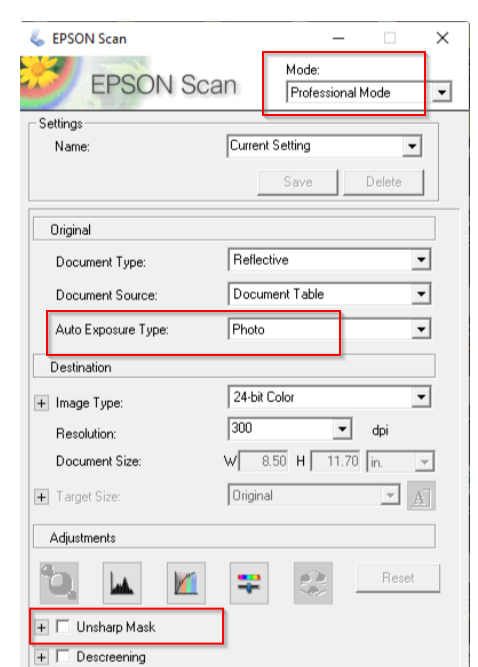
In the Epson Scan window, we need to have the following settings of
-
Mode: Professional Mode
-
Auto Exposure Type: Photo
-
Uncheck Unsharp Mask.
-
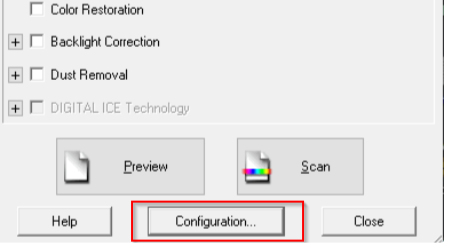
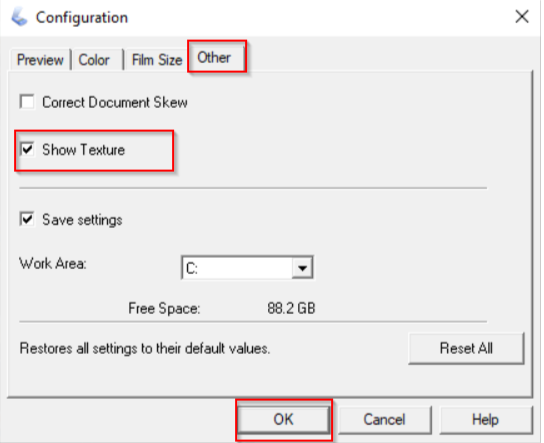
4. Click on Configuration → Other → Check 'Show Texture' option. (Each time you scan, this option has to be checked manually).
Once the user made the above configuration change, they were able to see the shadows on the embossed dots and Globalvision was able to read the braille.