Authored by: Terrence Boccarossa
Created: 20 August 2019
|
Type |
Informational |
|
Software |
GlobalVision Desktop |
|
Software version |
n/a |
|
Customer |
n/a |
DPR datamatrix
A DPR datamatrix (otherwise known as Dot Matrix QR) is a QR code which is comprised of dots instead of blocks, see example below
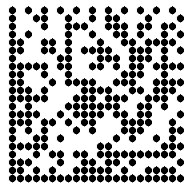
Since dots are being used, this leaves white spaces between the left vertical line and the bottom horizontal line.
To be able to allow the software to properly read this the gaps need to be closed.
Profile settings
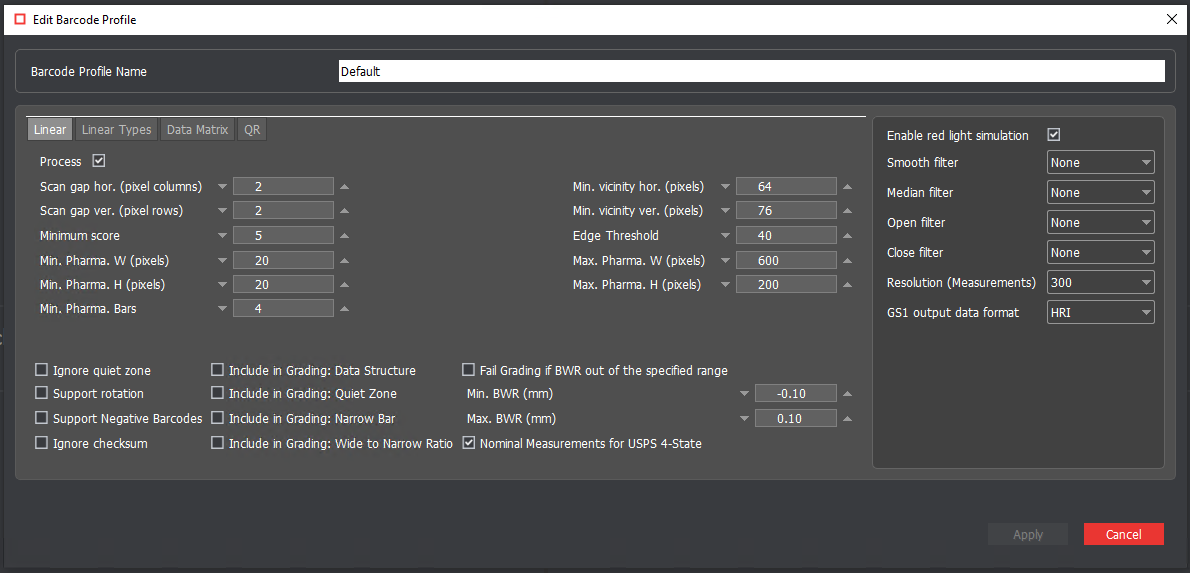
Within GlobalVision the current profile needs to be modified using the following settings:
Enable Red Light simulation (found on the right)
To know which options to choose,
Open Filter: Applies to black dots
Closed Filer: Applies to white dots
Options available: 1x or 2x.
Between each dot there are 4 pixels. 1x brings in the dots closer by 1 pixel.
2x brings it closer by 2 pixels, which allows to remove any white space on the left vertical line and the bottom horizontal line.
Diagram
█ █ (Representing 2dots with 4 pixels in between each other)
Filters
1x: ██ ██
2x: ██████
It merges all the dots together.
This will now allow the barcode inspection to read and grade the QR code accordingly.